Best Tools to Build and Launch a SaaS Product Faster
Not long ago, launching a SaaS product meant hiring backend engineers, devops specialists, a designer, and a growth person before writing a single line of product code. The infrastructure alone — servers, authentication systems, payment processing, email delivery, analytics pipelines — consumed months of setup and significant capital before the first user ever logged in.
That era is over. The most competitive SaaS businesses being built right now are launching faster, leaner, and smarter than anything that came before them. Solo founders and two-person teams are shipping production-ready products in weeks, not months, by assembling a modern SaaS tech stack that handles every layer of the business — from database to deployment to dunning management — through purpose-built, developer-friendly tools.
The shift is structural. A new category of infrastructure tools has emerged over the past four years that essentially hands founders the building blocks of a complete backend out of the box. Authentication, real-time databases, serverless functions, transactional email, subscription billing, product analytics — these are now services a developer connects to rather than systems an engineering team builds and maintains.
This guide covers the 17 best SaaS startup tools that define the modern founder stack in 2026. Each tool is explained in the context of how real founders use it, where it fits in the architecture, and what a team at a specific stage should understand before adopting it. A full comparison table is included. Whether building a first SaaS product or auditing an existing stack that has grown unwieldy, this guide provides the clarity needed to move faster.
TL;DR — The Fastest SaaS Stack to Launch Right Now
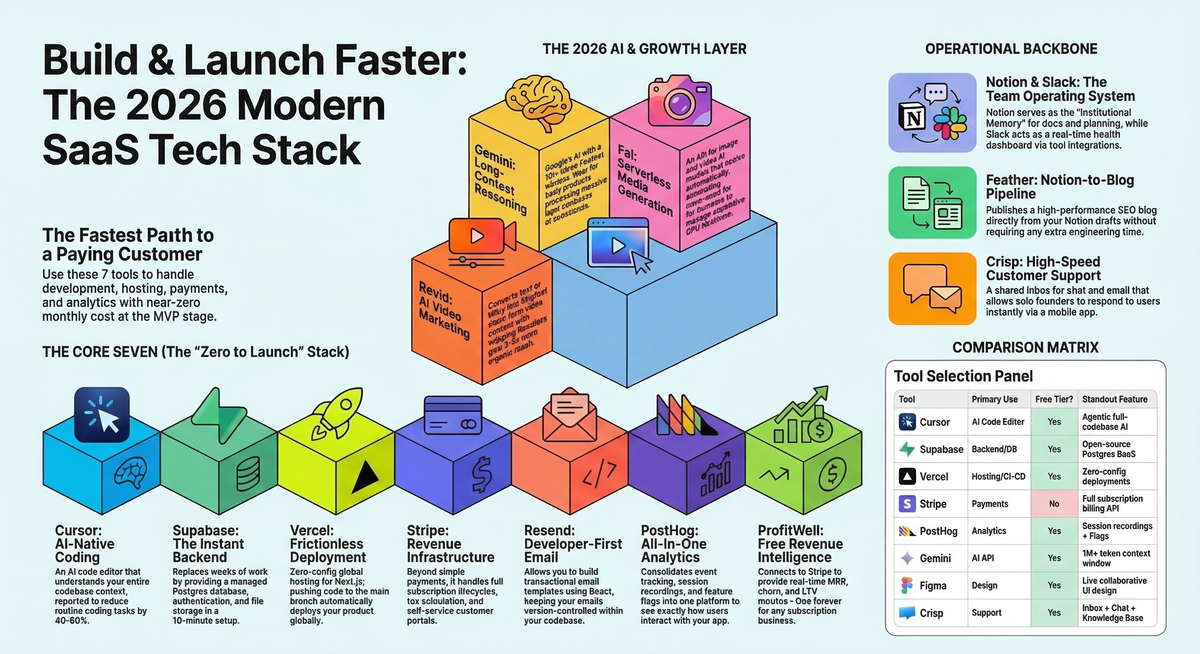
For founders who want to know the minimum viable stack before reading further: the following seven tools form the fastest path from idea to paying customer in the current environment. Total monthly cost at the MVP stage is effectively zero until revenue arrives.
- Cursor — AI-native code editor that understands your entire codebase
- Supabase — Postgres database, authentication, storage, and real-time in one platform
- Vercel — Zero-config deployment and global hosting for frontend and serverless functions
- Stripe — Complete subscription billing, payments, and revenue infrastructure
- Resend — Developer-first transactional email with React Email templates
- PostHog — Open-source product analytics, session recordings, and feature flags
- ProfitWell — Free subscription revenue analytics — MRR, churn, LTV — connected to Stripe
This stack handles development velocity, backend infrastructure, payments, customer communication, product intelligence, and revenue monitoring. Everything else in this guide builds on top of it for specific growth needs.
The Modern SaaS Tech Stack
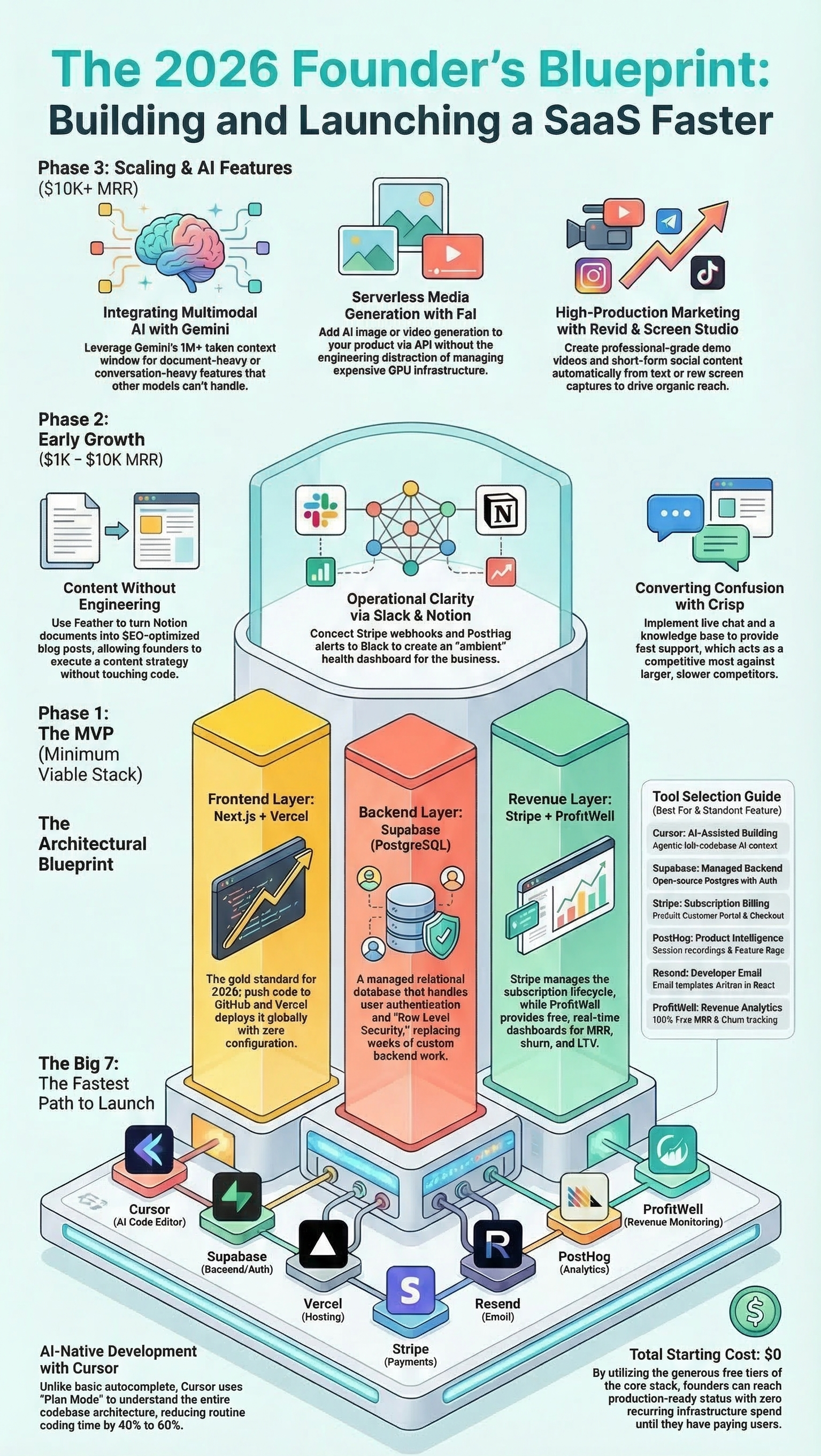
Understanding how a modern SaaS product is architecturally constructed makes tool selection easier and more intentional. The architecture has evolved significantly from the monolithic, self-hosted systems that dominated a decade ago. Today's SaaS products are assembled from specialized layers, each handled by a best-in-class managed service.
Frontend Layer
Next.js + React + Vercel
The frontend of a modern SaaS product is almost always built with Next.js, which provides server-side rendering, static generation, API routes, and edge middleware in a single framework. Vercel, which created Next.js, is the natural deployment target — pushing a commit to the main branch is all that is required to deploy globally.
Backend & Database Layer
Supabase (PostgreSQL)
Rather than building a custom backend, founders now connect to a managed Postgres database through Supabase, which also ships authentication, file storage, and real-time subscriptions as part of the same platform. This replaces weeks of backend development with a 10-minute setup.
Payments & Billing Layer
Stripe
Stripe is the payment layer. Subscription creation, upgrade and downgrade flows, trial periods, invoice generation, dunning management, tax calculation — all handled through Stripe's API without building any of that logic manually.
Email Infrastructure Layer
Resend
Transactional emails — password resets, welcome messages, onboarding sequences, billing receipts, plan change confirmations — are sent through Resend. Templates are written in React, version-controlled alongside the product code, and deployed automatically.
Analytics & Product Intelligence Layer
PostHog
PostHog captures every user event, records sessions, runs A/B experiments, manages feature flags, and provides funnel and cohort analysis in a single platform. The open-source model means data never has to leave the team's control.
Revenue Monitoring Layer
ProfitWell
ProfitWell connects to Stripe and provides real-time subscription metrics: monthly recurring revenue, churn rate, average revenue per user, lifetime value, and expansion revenue. It is free forever and should be connected from the moment the first subscription is activated.
What makes this architecture powerful is the integration density. These services are designed to work together. Supabase Auth events trigger Resend emails. Stripe webhooks update PostHog user properties. Vercel preview URLs let the team review PostHog funnels on staging data before releasing. The entire system communicates without custom middleware.
Quick List — Best SaaS Tools for Founders
The following 17 tools form the complete SaaS development stack covered in this guide. Each is explained in detail in the sections that follow.
1. Cursor — AI-native code editor that works with the full codebase
2. Supabase — Backend infrastructure — database, auth, storage, and real-time
3. Vercel — Deployment, hosting, and global CDN for frontend applications
4. Resend — Transactional email infrastructure built for developers
5. Stripe — Subscription billing and payment processing
6. Notion — All-in-one workspace for docs, planning, and operations
7. Feather — Notion-powered blog publishing with built-in SEO
8. Figma — Collaborative UI and UX design tool
9. Revid — AI video creation for product marketing and content
10. SuperX — X (Twitter) analytics for founders building in public
11. PostHog — Open-source product analytics, flags, and experiments
12. Gemini — Google's multimodal AI API for builders
13. Fal — AI model inference for media-generative SaaS products
14. Crisp — Customer support platform with live chat and knowledge base
15. Slack — Team communication and operational notification hub
16. Screen Studio — Professional screen recording for demos and onboarding
17. ProfitWell — SaaS revenue analytics — free forever, connected to Stripe
Detailed Tool Breakdown
Each tool below is explained in the context of a founder building a SaaS product — what it does, why it belongs in the stack, how it connects to other tools, and what to know before adopting it.
1. Cursor — The AI Code Editor Built for Codebase-Level Thinking
Cursor is a code editor built as a fork of Visual Studio Code with artificial intelligence embedded at every level of the development experience. Unlike AI plugins that provide line-by-line autocomplete, Cursor indexes the entire project and maintains context across every file, function, and dependency in the codebase. This distinction changes the quality of AI assistance dramatically.
The most powerful Cursor workflow for SaaS founders is Plan Mode, which requires the AI to outline its entire approach before making any changes. Describing a new feature in natural language produces a step-by-step implementation plan that a developer can review, edit, and approve before a single file is touched. This prevents the AI from making well-intentioned but architecturally inconsistent changes that break unrelated parts of the system.
Background Agents take this further by allowing tasks to run in parallel. While reviewing an agent's implementation of one feature, another can be working on a separate module simultaneously. For a solo founder wearing every hat in the business, this multiplies effective development throughput by a meaningful margin.
Cursor supports model selection across Anthropic, OpenAI, and Google, so teams are not locked into a single AI provider's capabilities. The built-in browser allows front-end testing, live error inspection, and immediate bug fixing without leaving the editor. Experienced developers report 40 to 60 percent reductions in time spent on routine coding tasks — a claim that becomes plausible once the codebase-aware context is experienced firsthand.
Cursor reached $500 million ARR faster than nearly any developer tool in history. More relevant to a founder, it has become the default editor in the indie hacker community precisely because its impact on shipping speed is felt immediately, not after an extended learning curve.
|
Key Takeaway: Cursor is not autocomplete at scale.
It is a co-developer that understands the product architecture. Starting with
Plan Mode prevents AI-generated code from diverging from the system design,
and Background Agents turn a single developer's output into something that
previously required a team. |
2. Supabase — The Open-Source Backend That Replaces an Entire Engineering Role
Supabase is an open-source backend platform built on PostgreSQL that provides a relational database, user authentication, file storage, real-time subscriptions, and edge functions through a single managed service. A new project is production-ready in under 10 minutes. The auto-generated REST and GraphQL APIs mean the frontend can query the database directly without building a custom API layer.
The authentication system is the feature most SaaS founders encounter first. Email and password login, OAuth providers including Google, GitHub, Apple, and Twitter, magic link authentication, and phone-based OTP are all supported out of the box. Row Level Security enforces data access rules directly in the database engine, which means a user requesting another user's data is blocked at the database level before the application logic ever runs. For multi-tenant SaaS products, this is the correct architectural pattern from day one.
The comparison with Firebase comes up constantly in founder communities. The practical answer: Supabase uses a relational PostgreSQL model, which handles the structured, query-heavy data that most SaaS products involve — user records, subscription states, feature configurations, usage events. Firebase uses NoSQL Firestore, which is optimized for mobile apps where offline sync and document-centric data models are priorities. For a web-based SaaS product, the relational model is the better default. Supabase pricing is also tiered and predictable; Firebase pricing is per operation, which creates bills that can spike unexpectedly as usage grows.
Supabase can be self-hosted on any infrastructure that runs Docker, which removes vendor lock-in entirely. The free tier supports two projects with 500 MB of database storage and 50,000 monthly active users on authentication — enough to validate most products before spending a dollar.
|
Key Takeaway: Supabase compresses weeks of backend
development into a single afternoon of setup. Row Level Security handles
multi-tenant access control at the database layer, which is more secure and
less error-prone than implementing it in application code. The self-hosting
option ensures no lock-in as the product scales. |
3. Vercel — Deployment That Disappears Into the Background
Vercel is a cloud deployment platform optimized for Next.js applications and modern JavaScript frameworks including React, Vue, Svelte, Astro, and SvelteKit. Connecting a GitHub, GitLab, or Bitbucket repository takes under two minutes. Every push to the main branch deploys automatically to a globally distributed CDN. Every pull request generates a unique preview URL with its own isolated environment.
The developer experience is the entire product. There are no servers to provision, no deployment pipelines to configure, no SSL certificates to renew, no Docker images to build. For a solo founder or small team, this is not a minor convenience — it is hours of infrastructure work eliminated every week, permanently.
Vercel Edge Functions run code at more than 30 global regions, reducing response times for international users without any geographic configuration. The Image Optimization API compresses and resizes images on the fly, improving Core Web Vitals scores without changing the application code. Vercel Analytics surfaces performance data including Largest Contentful Paint and Cumulative Layout Shift directly in the dashboard, making performance visible without adding a separate monitoring tool.
The Hobby plan is free and sufficient for personal projects, experiments, and early validation. The Pro plan at $20 per month adds team access controls, higher build minute limits, and production-grade uptime SLAs. Most solo founders remain on the Hobby plan through their entire MVP stage without constraint.
|
Key Takeaway: Vercel eliminates deployment friction
so completely that shipping code becomes a reflexive act rather than a
planned event. The preview URL workflow alone changes how fast design
feedback and QA can happen — stakeholders can review a change on a live URL
within minutes of the pull request being opened. |
4. Resend — Transactional Email That Belongs in the Codebase
Resend is a transactional email API built by and for developers. It handles every email triggered by user actions: account creation, password resets, email verification, onboarding sequences, trial expiration notices, billing receipts, plan upgrade confirmations, and subscription renewal reminders. The API is designed to feel native to a modern TypeScript or JavaScript codebase.
The defining feature is React Email — an open-source library developed by the Resend team that allows email templates to be built using standard React components. Instead of writing email-compatible HTML with inline styles and table-based layouts — a process that is both tedious and error-prone — developers write JSX. Resend compiles it to email-safe HTML at send time. Templates live in the same git repository as the product code, go through code review, and are testable in a local browser before any email is sent.
Deliverability is the invisible foundation of transactional email. Resend manages sender reputation, handles SPF, DKIM, and DMARC domain authentication, and monitors delivery rates across major inbox providers. A failed password-reset email is not just a support ticket — it is a user who cannot log in and will often churn rather than investigate. Reliable delivery is the baseline expectation, and Resend treats it as an engineering problem rather than a marketing one.
The free tier allows 100 emails per day and 3,000 per month with a custom domain. The $20 per month plan removes daily limits and supports 50,000 monthly emails. Resend integrates directly with Supabase Auth hooks, which means setting up triggered emails for every authentication event requires minimal configuration.
|
Key Takeaway: React Email templates in the same
codebase as the product is a paradigm shift from managing email HTML in a
separate system. When template changes go through pull requests and can be
previewed locally, the quality of transactional email improves and the maintenance
burden drops significantly. |
5. Stripe — The Revenue Infrastructure That SaaS Products Are Built Around
Stripe is the payment and billing infrastructure that powers most SaaS subscription businesses. Its scope extends well beyond card processing: Stripe Billing handles the full subscription lifecycle including plan creation, trial periods, upgrade and downgrade flows, prorated invoicing, usage-based metering, coupon and discount application, tax calculation through Stripe Tax, and subscription pausing. Stripe Checkout provides a prebuilt, conversion-optimized payment page that handles the payment form, validation, 3D Secure authentication, and international payment methods without custom code.
For a SaaS founder, the most important Stripe component after initial setup is the webhook system. Every significant billing event — new subscription, payment success, payment failure, subscription cancellation, trial expiration — fires a webhook that the application can respond to. A payment failure webhook can trigger a Resend dunning email, update a Supabase user record, and fire a PostHog event tracking churn risk, all from a single event. Building this event-driven revenue workflow is what transforms Stripe from a payment processor into the central nervous system of a SaaS business's revenue layer.
The Stripe Customer Portal is one of the most underutilized features in the SaaS stack. It provides a fully functional self-service portal where customers can update their payment method, download past invoices, change their subscription plan, and manage cancellations — all without the founder writing a single line of custom UI. For a solo founder, enabling the Customer Portal eliminates an entire category of customer support tickets immediately.
Pricing is 2.9 percent plus 30 cents per successful card transaction in the United States, with no monthly fees. Stripe Billing adds an additional 0.5 to 0.8 percent on managed subscription revenue. There are no minimums, making it entirely risk-free to add to an MVP before the first paying customer exists.
|
Key Takeaway: Stripe is not a commodity payment
processor — it is the revenue architecture of the product. Connecting
webhooks to PostHog, Resend, and Supabase from day one creates an
event-driven billing system that responds to customer behavior automatically
and reduces the revenue leakage that passive billing setups allow. |
Free to browse. No account needed.
6. Notion — The Operational Backbone of a Lean SaaS Team
Notion is an all-in-one workspace that combines documents, databases, wikis, project management, and task tracking in a single application. For a small SaaS team, it replaces the sprawling combination of Confluence for documentation, Trello or Jira for task management, Google Docs for meeting notes, and Airtable for structured data — consolidating all of it into one searchable, interconnected workspace.
The relational database feature is what separates Notion from a note-taking app. A product roadmap database can be linked to a customer research database, which is linked to a sprint tasks database, which is linked to a deployment log. Filtered views let the founder see only the features planned for the current sprint, or only the customer interviews that informed a particular decision, or only the open bugs affecting a specific module — all from the same underlying data. This interconnected structure is how a two-person team maintains the operational clarity of a twenty-person team.
For SaaS founders specifically, Notion serves as the company's institutional memory. Customer discovery notes, competitive analysis, onboarding SOPs, API integration documentation, investor update drafts, and content calendars all live in one place that is accessible on any device and searchable across every document. When bringing on a contractor or early hire, the entire context of the product and its decisions is transferable in one Notion workspace share.
|
Key Takeaway: Notion's value is consolidation and
searchability. Every minute spent searching for context across five different
tools is a minute not spent building. A well-structured Notion workspace
becomes the operating system of the company — the single source of truth that
eliminates coordination overhead as the team grows. |
7. Feather — From Notion Draft to SEO Blog Post Without Touching Code
Feather is a blog publishing platform that uses Notion as its content management system. Content is written in Notion — the same tool the team already uses for documentation and planning — and Feather automatically publishes it to a hosted blog on a custom domain with proper SEO structure, canonical URLs, meta descriptions, Open Graph images, and sitemap generation.
The problem Feather solves is concrete. Building a custom blog with a headless CMS requires design work, ongoing maintenance, and developer time every time the structure needs changing. Using a hosted blogging platform like Substack or Medium trades control over SEO and branding for convenience. Feather takes the middle path: Notion handles the writing experience that founders already know, and Feather handles the publishing infrastructure that turns it into SEO-indexed web content.
Content marketing is the highest-return long-term acquisition channel for most SaaS products. Organic traffic compounds over time in a way that paid acquisition cannot match. Feather reduces the activation energy for maintaining a consistent publishing schedule by eliminating the friction between writing and publishing. A post drafted in Notion appears on the blog within minutes of being marked ready, with no developer involvement required.
|
Key Takeaway: Feather is the practical answer to the
perennial founder question of how to maintain a content strategy without
dedicating engineering resources to it. For Notion-native teams, it is
genuinely zero additional workflow — the writing happens where it already
happens, and Feather handles everything else. |
8. Figma — Design and Prototype Before a Line of Code Is Written
Figma is a browser-based product design tool used to create user interface mockups, interactive prototypes, design systems, and production-ready visual assets. No installation is required, and multiple team members can edit the same file simultaneously with changes reflected in real time across all sessions.
For SaaS founders, Figma serves two distinct phases of the product lifecycle. Before development begins, it is the fastest way to visualize and validate a product concept. A clickable prototype built in Figma simulates real user flows — signup, onboarding, dashboard navigation, settings management — without a working backend. Showing a prototype to potential users in customer discovery interviews reveals UX problems in a day that would otherwise take a sprint to discover after building.
After launch, Figma becomes the living design system that keeps the product visually consistent as it grows. A component library in Figma — buttons, form inputs, modals, navigation patterns, color tokens, typography scales — gives both designers and developers a shared reference that prevents visual inconsistency from accumulating over time. The Inspect feature lets developers see exact measurements, CSS properties, and color values for every element by clicking on it, removing the back-and-forth that slows implementation.
Figma AI now assists with generating layout variations, auto-applying styles across components, and summarizing design feedback. The free plan supports three active projects and unlimited collaborators in view-only mode — sufficient for most solo founders and early teams. The Professional plan at $15 per editor per month adds unlimited version history and advanced sharing controls.
|
Key Takeaway: The founder who skips Figma and builds
directly from mental mockups consistently rebuilds more than the founder who
validates in design first. Prototyping a feature before building it takes
hours. Rebuilding it after users tell the team it does not work takes days. |
9. Revid — AI-Generated Video for Founders Without a Video Team
Revid is an AI video creation platform that converts text input, product URLs, or raw scripts into finished short-form video content. The output includes voiceover narration, automatically matched B-roll footage, animated captions, background music, and branded formatting — delivered without a video editor, a recording session, or post-production work.
The distribution reality that makes Revid relevant: short-form video content consistently generates 3 to 5 times the organic reach of equivalent text posts on platforms including LinkedIn, X, and YouTube Shorts. For a SaaS founder without a dedicated marketing hire, the gap between having a message and producing video content has historically been the production bottleneck. Revid closes that gap almost entirely.
The strongest use cases for Revid in a SaaS context are product launch announcements, feature update summaries, educational content explaining the problem the product solves, and behind-the-scenes founder content for audience building. A weekly video content cadence that previously required hours of editing time can be reduced to 30 minutes of scripting and Revid generation. Combined with Screen Studio for live demo footage and SuperX for distribution analytics, Revid is the production layer of a lean video marketing operation.
|
Key Takeaway: Revid eliminates the production
barrier between a founder with a message and a founder with video
distribution. For products targeting audiences on LinkedIn, X, or YouTube,
consistent video content at this cost and effort level is a competitive
advantage that larger companies with slower production cycles cannot easily
match. |
10. SuperX — Analytics That Make X (Twitter) a Real Growth Channel
SuperX is a dedicated analytics and growth platform for X (formerly Twitter) that surfaces metrics and patterns beyond what the native platform's analytics provide. It tracks post performance, engagement rate by content type, follower growth velocity, best-performing threads, click-through data, and profile visit attribution across a historical dataset.
For SaaS founders who use X as a distribution channel — building in public, sharing product updates, writing educational threads, engaging with communities — the native X analytics are too shallow to make data-informed decisions. SuperX provides the depth needed to understand which content formats generate reach, which topics drive the highest engagement from relevant audiences, and what posting cadence produces consistent growth rather than isolated spikes.
The practical workflow: review SuperX weekly to identify the two or three posts that overperformed relative to the baseline, understand what they had in common — format, topic, timing, opening line — and apply those patterns to the next week's content. Over three to four months, this compounding feedback loop produces a content strategy grounded in actual audience response rather than instinct. For a founder investing time in X as a growth channel, the difference between posting with and without this data is the difference between a strategy and an experiment.
|
Key Takeaway: SuperX is valuable in direct
proportion to how seriously X features in the go-to-market strategy. Founders
building in public or using organic social distribution as a primary early
acquisition channel will recover the tool's cost in content quality improvement
within weeks. |
11. PostHog — The Product Analytics Platform That Replaces Five Separate Tools
PostHog is an open-source product analytics platform that consolidates event tracking, session recordings, heatmaps, funnel analysis, cohort analysis, retention curves, A/B testing, feature flags, and a data warehouse into a single product. The open-source model allows self-hosting on any infrastructure for teams that need complete data sovereignty, or a managed cloud deployment for teams that prefer zero operational overhead.
The session recordings feature alone changes how product decisions get made. Watching real users navigate the product reveals friction points that event analytics obscure entirely. A funnel may show a 40 percent drop-off at step three of onboarding; a session recording shows the exact moment users encounter a form that is confusing, an error message that is unclear, or a UI pattern that does not behave as expected. The same analysis that takes a week of user interviews to surface can be completed in an hour of session review.
Feature flags in PostHog allow new features to be released to a targeted percentage of users before general availability. This pattern — gradual rollout, measure impact, release or roll back — is how product teams at any stage can iterate without introducing regression risk for the entire user base. The A/B testing layer adds statistical confidence to the measurement, ensuring changes are based on signal rather than noise.
PostHog's data warehouse integrates with Stripe, so revenue data and product usage data live in the same query environment. A founder can ask which user segments generate the most expansion revenue, which onboarding completions have the highest 90-day retention, and which features correlate with plan upgrades — all without exporting data between systems. PostHog's free tier covers one million events per month, 5,000 session recordings, and one million feature flag calls. Ninety-eight percent of users, by PostHog's own reporting, never exceed the free tier.
|
Key Takeaway: PostHog replaces the multi-tool
analytics stack — Mixpanel for events, FullStory for recordings, LaunchDarkly
for flags, Optimizely for experiments — with a single platform that shares
context across all of these functions. For a solo founder or small team, the
time saved in not maintaining integrations between separate tools is as
valuable as the analytics themselves. |
12. Gemini — Google's Multimodal AI for SaaS Products That Think
Gemini is Google's family of large language models, available to developers through Google AI Studio and the Gemini API. The model family spans several capability tiers, from the lightweight Flash models optimized for speed and cost to the full Pro and Ultra models optimized for complex reasoning, long-context tasks, and multimodal input processing.
The context window is Gemini's most distinctive capability for SaaS builders. The Gemini 1.5 and 2.0 model families support context windows of one million tokens or more in a single request. This enables applications that process entire legal contracts, full codebase reviews, multi-hour call transcripts, or complete customer conversation histories in a single inference call — tasks that other models must break into chunks, losing coherence in the process.
For SaaS founders, the practical applications are broad: intelligent document processing for legal or compliance products, customer-facing chatbots trained on product documentation, automated support ticket categorization and response drafting, code review assistants embedded in developer tools, and structured data extraction from unstructured text at scale. Gemini also processes images and video natively, which opens capabilities for products that analyze visual content — product screenshots, engineering diagrams, scanned documents, or user-submitted media.
Google AI Studio provides a free tier with generous rate limits for development. Production deployments can use the Gemini API directly for simple billing or Vertex AI for enterprise-grade compliance, dedicated deployments, and data residency guarantees. The API follows standard REST conventions with streaming support, making integration into a Vercel-hosted Next.js application straightforward.
|
Key Takeaway: Gemini's long-context window addresses
a category of AI application that other models cannot handle reliably — any
task that requires processing a large body of information in a single
coherent analysis. Founders building AI features into document-heavy,
conversation-heavy, or multimodal SaaS products should evaluate Gemini before
defaulting to alternatives with more limited context. |
13. Fal — Serverless AI Inference for Media-Generative Products
Fal is a serverless AI model inference platform that provides API access to image generation, video generation, audio processing, and other media AI models with a managed infrastructure layer that handles scaling, queuing, and GPU resource management automatically. Developers make an API call; Fal returns the generated media.
The infrastructure problem Fal solves is significant. Running image or video generation models at production scale requires GPU resources that are expensive to provision, complex to manage, and highly variable in utilization. A SaaS product with 100 users generating images throughout the day experiences request spikes that are difficult to handle cost-efficiently with dedicated GPU instances. Fal abstracts this entirely — the inference infrastructure scales with demand, and costs align with actual usage rather than provisioned capacity.
The use cases that Fal enables for SaaS builders include AI headshot generators, product visualization and mockup tools, video avatar creation services, AI-powered design assistants, automated thumbnail generation, and any feature that produces visual output from user input. Fal supports the major open-source generative models and provides a consistent API surface that insulates the product from underlying model changes. When a better model becomes available, the Fal integration absorbs the update without application-level changes.
|
Key Takeaway: Fal is the practical choice for any
SaaS product where image or video generation is a user-facing feature. The
alternative — managing GPU infrastructure independently — is an engineering
distraction that consumes resources better spent on the actual product. Fal's
pay-per-use model also aligns infrastructure costs with revenue in a way
dedicated GPU instances never can. |
14. Crisp — Customer Support That Converts Confusion Into Retention
Crisp is a customer messaging platform that consolidates live chat, email support, social media messaging, and a knowledge base into a shared team inbox. It occupies the practical middle ground between a basic chat widget and an enterprise support platform, which makes it the right fit for SaaS products from launch through their first few hundred customers.
Fast customer support is a genuine competitive moat for small SaaS companies. A solo founder who responds to a confused new user within 20 minutes has a better chance of converting that user into a long-term subscriber than a larger competitor whose support queue takes 48 hours. Crisp makes this responsiveness operationally sustainable. The mobile app delivers real-time push notifications for new conversations, so a founder can respond from anywhere without monitoring a dashboard continuously.
The shared inbox brings email, in-app chat, and social messages into a single chronological view, organized by conversation. Customer context — plan tier, signup date, recent events pulled from PostHog or Segment, previous support history — can be surfaced alongside each conversation, giving the person responding enough information to answer intelligently without switching between five tabs. The knowledge base feature serves common questions automatically before a human is needed, reducing repetitive support load as the user base grows.
As the team grows, Crisp's chatbot handles first-line triage: greeting new visitors, qualifying intent, routing to the right team member, and capturing contact information outside of business hours. The free plan supports two seats. Paid plans start at $25 per month per workspace.
|
Key Takeaway: Support quality at the early stage is
a direct function of response time, not headcount. Crisp gives a single
founder the tooling to maintain support quality that scales with user growth
without requiring a dedicated support hire until the volume genuinely demands
one. |
15. Slack — The Operational Communication Layer of a SaaS Business
Slack is a team messaging platform organized around channels, threads, and direct messages, with an integration ecosystem connecting to virtually every tool in the SaaS stack. For remote-first teams — which describes the majority of SaaS startups today — Slack is not just a chat application. It is the environment where the business operates.
The integration layer is what elevates Slack beyond communication. Stripe webhooks can fire revenue events into a dedicated channel, so new subscriptions, upgrades, downgrades, and churns appear in real time. GitHub or Vercel notifications land in the engineering channel with direct links to the relevant commit, deployment, or pull request. PostHog can alert on sudden drops in activation or unusual event patterns. Crisp can escalate priority support conversations into Slack with full context attached. The result is an ambient operational awareness — a SaaS founder monitoring Slack throughout the day is effectively monitoring the health of the entire business without actively checking five separate dashboards.
For solo founders, Slack channels also serve as a structured record of decisions. A channel for product decisions, one for customer feedback, one for revenue events, and one for deployment history creates a searchable institutional log that becomes invaluable when adding a co-founder, investor, or first employee months later. The context is already documented without any additional effort.
|
Key Takeaway: Slack's signal-to-noise ratio depends
entirely on integration quality. A well-configured Slack workspace where
meaningful business events surface automatically creates operational clarity
that would otherwise require active monitoring of multiple platforms. The
setup investment of configuring Stripe, Vercel, and PostHog notifications
into dedicated Slack channels takes two hours and pays dividends
indefinitely. |
16. Screen Studio — Screen Recordings That Look Like They Were Professionally Produced
Screen Studio is a macOS screen recording application that produces polished, cinematic-quality recordings with automated post-production effects applied at capture time. It adds zoom effects to clicked UI elements, applies motion blur during cursor movements, and wraps recordings in a device frame automatically. The output looks like professional video production without any editing software.
The business case for high-quality screen recordings in a SaaS context is straightforward: product demos are often the first substantive interaction a potential customer has with the product. A grainy, inconsistently sized screen recording with a visible taskbar and an erratic cursor sends a signal that undermines the product's credibility regardless of how good the underlying product is. Screen Studio recordings remove this credibility tax completely.
The use cases span the entire customer lifecycle. Landing page hero videos that demonstrate the product in action, onboarding walkthrough videos embedded in the product itself, feature announcement clips for social distribution, investor pitch screen walkthroughs, and customer support documentation all benefit from the quality improvement. Screen Studio recordings export in formats suitable for embedding on Vercel-hosted pages, uploading through Revid for social video generation, or embedding in Feather blog posts and Notion documentation.
Screen Studio is a one-time purchase of approximately $89, with no subscription fee. On a per-use basis over the lifetime of a product, it is one of the highest-ROI items in the entire toolkit.
|
Key Takeaway: Screen Studio eliminates the quality
gap between what a founder wants to show and what a potential customer
actually sees. At a one-time cost with no ongoing fee, improving every demo,
every onboarding video, and every feature announcement for the product's
entire lifetime makes this one of the easiest purchasing decisions in the
SaaS stack. |
17. ProfitWell — Free Revenue Analytics That Every Subscription Business Needs
ProfitWell (now part of Paddle) is a subscription revenue analytics platform that connects directly to Stripe, Braintree, Chargebee, and other billing systems to provide accurate, real-time metrics for the financial health of a SaaS business. It tracks monthly recurring revenue, annual recurring revenue, churn rate (both voluntary and involuntary), average revenue per user, customer lifetime value, and the movements between each cohort — all broken down by new business, expansion, contraction, and churn.
The MRR movement breakdown is the feature most founders find most illuminating. Knowing that total MRR is $15,000 is less useful than knowing that $2,000 came from new subscriptions, $800 from plan upgrades, $400 was lost to downgrades, and $600 to cancellations this month. Each of these movements requires a different response. The new business number speaks to acquisition effectiveness. The expansion number reflects the quality of the upgrade path. The contraction and churn numbers point to retention problems that pricing, product, or support decisions might address.
ProfitWell Retain is the complementary product that addresses involuntary churn — revenue lost to failed payments, expired cards, and declined transactions. Research consistently shows that subscription businesses lose 9 to 11 percent of revenue to payment failures before any customer makes an active decision to cancel. Retain automates smart retry schedules, personalized dunning email sequences, and in-app card update prompts that recover a meaningful fraction of this revenue passively.
The core ProfitWell analytics product is free forever with no usage limits, no feature gating, and no expiration. Connecting it to Stripe takes under five minutes. It should be part of the stack from the moment the first subscription is activated, not added later as an afterthought.
|
Key Takeaway: ProfitWell makes the financial health
of a subscription business legible in real time at zero cost. The MRR
movement breakdown alone — distinguishing new business from expansion from
churn — provides the clarity needed to make informed decisions about acquisition,
pricing, and retention, rather than reacting to a single aggregate revenue
number. |
How These SaaS Tools Compare at a Glance
The table below summarizes all 17 tools across six dimensions: primary use case, ideal audience, free tier availability, pricing model, and the single feature that most differentiates each tool. Use it to quickly identify where gaps exist in an existing stack or to evaluate overlap between tools already in use.
|
Tool |
Primary Use |
Best For |
Free Tier |
Pricing |
Standout Feature |
|
Cursor |
AI Code Editor |
Developers /
Builders |
Yes (limited) |
Free / $20+/mo |
Agentic
full-codebase AI |
|
Supabase |
Database +
Auth |
SaaS & web
apps |
Yes (2
projects) |
Free / $25+/mo |
Open-source
Postgres BaaS |
|
Vercel |
Deployment
& Hosting |
Frontend
developers |
Yes (hobby) |
Free / $20+/mo |
Zero-config
CI/CD deploys |
|
Resend |
Transactional
Email |
Developers |
Yes (100/day) |
Free / $20+/mo |
React Email
templates |
|
Stripe |
Payments &
Billing |
Any revenue
product |
No minimum |
2.9% + 30c/txn |
Full
subscription billing API |
|
Notion |
Docs &
Project Mgmt |
Teams &
solo founders |
Yes |
Free / $10+/mo |
All-in-one
linked databases |
|
Feather |
Notion Blog
Publisher |
Content-led
SaaS |
No |
From $19/mo |
Notion-to-SEO
blog pipeline |
|
Figma |
UI/UX Design |
Designers
& founders |
Yes (3 files) |
Free / $15+/mo |
Live
collaborative design |
|
Revid |
AI Video
Creation |
Marketing
without a team |
Trial |
From ~$29/mo |
Text or URL to
finished video |
|
SuperX |
X (Twitter)
Analytics |
Founders
building in public |
Limited |
Paid
subscription |
Deep
engagement data for X |
|
PostHog |
Product
Analytics |
Product &
growth teams |
Yes (generous) |
Free /
usage-based |
Open-source
all-in-one analytics |
|
Gemini |
Multimodal AI
API |
AI-native SaaS
builders |
Yes (AI
Studio) |
Pay-per-use |
1M+ token
context window |
|
Fal |
AI Model
Inference |
Media-generative
SaaS |
Credits |
Pay-per-use |
Fast image
& video AI APIs |
|
Crisp |
Customer
Support Chat |
SaaS support
teams |
Yes (2 seats) |
Free / $25+/mo |
Inbox + live
chat + knowledge base |
|
Slack |
Team
Communication |
Teams of all
sizes |
Yes (limited) |
Free /
$7.25+/mo |
Workflow +
deep integrations |
|
Screen Studio |
Screen
Recording |
Demo &
onboarding content |
Trial |
One-time ~$89 |
Cinematic
auto-zoom recordings |
|
ProfitWell |
Revenue
Analytics |
Subscription
SaaS |
Yes (forever) |
Free |
MRR, churn
& LTV dashboards |
Seven of the 17 tools in this table have genuinely unlimited or production-capable free tiers: Supabase, Vercel, Resend, PostHog, Notion, Crisp, and ProfitWell. A solo founder assembling the minimum viable stack — Cursor, Supabase, Vercel, Stripe, Resend, PostHog, and ProfitWell — reaches production readiness with total monthly infrastructure costs close to zero until transaction volume justifies Stripe fees.
The SaaS Stack Most Successful Indie Hackers Use
The indie hacker community — solo founders and very small teams building profitable internet businesses without institutional funding — has converged on a remarkably consistent tool set over the past two years. The convergence is not coincidental; it reflects a shared set of constraints and priorities that most bootstrapped founders face.
The core indie hacker stack in 2026 is: Cursor for development, Supabase for the entire backend, Vercel for deployment, Stripe for payments, Resend for transactional email, and PostHog for product analytics. This combination shares four properties that explain its adoption.
Minimal infrastructure overhead. Every tool in this stack is managed and hosted by the provider. There are no servers to maintain, no database clusters to scale, no email infrastructure to monitor. A solo founder can focus entirely on the product and the user experience without an operations function.
Scalable architecture from day one. None of these tools require a replatforming event as the product grows. Supabase scales to millions of rows and hundreds of thousands of users without changing the application code. Vercel auto-scales to any traffic level. Stripe handles any transaction volume. The architecture that works for the MVP is the architecture that works at $1 million ARR.
Low cost aligned with revenue growth. Every tool in the core stack has a free tier that supports the MVP stage. Paid tiers kick in at usage levels that almost always coincide with revenue generation. The infrastructure spend scales with the business rather than preceding it.
Fast iteration cycles. The combination of Cursor's AI-assisted development, Vercel's instant deployments, Supabase's auto-generated APIs, and PostHog's session recordings creates a feedback loop where a founder can ship a change, watch users interact with it in session recordings, and iterate within the same day.
The indie hackers achieving the most noticed results in communities like Hacker News, Indie Hackers, and X are almost universally using some variation of this stack. The variation usually involves one or two substitutions based on specific product requirements, but the architectural pattern — managed Postgres backend, serverless frontend deployment, API-first payments, and behavioral analytics — is consistent.
How to Build Your SaaS Stack by Stage
The right stack is not a fixed prescription — it evolves with the product and the team. Adding tools before the stage that requires them creates coordination overhead without delivering value. Adding them too late means operating with avoidable gaps. The following stage-based framework provides a practical guide.
MVP Stage — Minimum Viable Stack
The goal at the MVP stage is to reach the first paying customer as fast as possible with the least complexity. The stack at this stage should include: Cursor for development acceleration, Supabase for the entire backend layer including auth and database, Vercel for deployment, Stripe for payments, and Resend for any transactional email the product requires. PostHog should be added from day one, even if the founder does not actively monitor it initially — having behavioral data from the first user is more valuable than setting it up later with a backfill.
Notion, Figma, and Screen Studio are supporting tools that improve quality and reduce rework rather than enabling new capabilities. A Figma mockup before building reduces rebuilds. Notion keeps the product documented so context is not lost. Screen Studio improves the quality of every demo from the first.
Early Growth Stage — Adding Depth
Once the product has early users and is generating some revenue — typically the $1K to $10K MRR range — the stack expands to address gaps in customer support, content marketing, and distribution. Crisp covers the support layer, preventing customer confusion from turning into churn at a stage where every retained user matters. Feather enables a content marketing strategy without dedicated engineering work. ProfitWell provides revenue intelligence that helps founders understand where growth is coming from and where it is leaking.
At this stage, Slack becomes a genuine operational tool rather than just a communication channel — connecting Stripe webhooks, PostHog alerts, and Vercel deployments to dedicated channels turns it into the real-time health dashboard of the business.
Scaling Stage — AI Features and Distribution
At the scaling stage — typically $10K MRR and above with a small team — the stack can accommodate AI-powered features and systematic distribution. Gemini and Fal enter the picture when AI capabilities become part of the product itself rather than aspirational additions. Revid and SuperX support a systematic content and social distribution strategy. Screen Studio usage expands from demos to a full content library.
The principle throughout every stage is the same: add tools when a specific, identifiable gap creates friction or lost revenue. A tool adopted before its stage adds complexity without payoff. The founders who ship fastest are not those with the most tools — they are those who use the fewest tools that fully cover their actual requirements.
Frequently Asked Questions
What is the best tech stack to build a SaaS product?
The best SaaS tech stack for most founders in 2026 is Next.js on the frontend, Supabase for the database and authentication backend, Vercel for deployment, Stripe for payments, and Resend for transactional email. This combination covers every layer of a production SaaS product and can be assembled in a single day by a developer familiar with the tools. Total cost at the MVP stage is effectively zero. The stack scales without a replatforming event — the architecture that works for 100 users also works for 100,000 users with only configuration changes.
How do solo founders build SaaS products faster?
Solo founders ship faster by eliminating infrastructure work entirely and maximizing the time spent building product features that users actually experience. Every hour spent configuring servers, debugging deployment pipelines, or maintaining custom authentication logic is an hour not spent on the product. Managed services — Supabase for the backend, Vercel for deployment, Stripe for billing — handle all of that infrastructure without engineering involvement. Cursor then accelerates the remaining development work by an estimated 40 to 60 percent through AI-assisted coding that understands the full codebase context. The combination creates a leverage ratio that simply did not exist three years ago.
What tools do indie hackers use to build and launch SaaS products?
The tool set most commonly cited by successful indie hackers on X, Hacker News, and the Indie Hackers forum centers on Supabase for the backend, Vercel for hosting, Stripe for payments, PostHog for analytics, and Cursor for development. The stack is valued for its generous free tiers, minimal infrastructure overhead, and the speed with which a solo developer can reach a production-ready product. Resend for transactional email and ProfitWell for revenue analytics are common additions. The community has largely converged on this combination not through coordination but through independent validation of what actually ships fastest.
Is Supabase better than Firebase for SaaS?
For most web-based SaaS products, Supabase is the stronger choice. The relational PostgreSQL model handles structured data — user records, subscription states, billing history, feature configurations — more naturally than Firebase's document-based Firestore. Row Level Security enforces multi-tenant access control at the database level, which is more secure and less error-prone than application-level enforcement. Supabase pricing is tiered and predictable; Firebase charges per read, write, and delete, which creates costs that can spike sharply with usage growth. Firebase remains the better choice for mobile applications that need offline-first data sync, real-time multiplayer features, or deep Google ecosystem integration. For a web SaaS product, Supabase is the pragmatic default.
How does Stripe work for SaaS billing and subscriptions?
Stripe Billing manages the full subscription lifecycle through a combination of Products, Prices, Customers, and Subscriptions objects in its API. A Product represents what is being sold; a Price defines the billing interval, amount, and currency. A customer subscribes to a Price, and Stripe handles recurring charge attempts, invoice generation, trial period management, and dunning automatically. The webhook system fires events for every significant billing occurrence — successful payment, failed payment, subscription cancellation, trial expiration — which the application can respond to by updating user records, triggering emails through Resend, and logging events in PostHog. The Customer Portal allows users to manage their own subscriptions, payment methods, and invoice downloads without the founder building any custom UI.
What is the cheapest way to launch a SaaS product?
The minimum viable stack for a production SaaS product can be assembled at effectively zero monthly cost until the first paying customers arrive. Supabase's free tier covers the database and authentication layer for early traction. Vercel's Hobby plan handles deployment and hosting. Resend's free tier covers 3,000 emails per month. PostHog's free tier covers one million events monthly. ProfitWell is free forever. Stripe charges no monthly fee, only per-transaction fees once revenue exists. The only unavoidable upfront cost is a domain name at approximately $10 to $15 per year. A technically capable founder can reach the point of charging real customers with zero recurring infrastructure spend, validating the product entirely before committing to paid infrastructure tiers.
Final Thoughts
The most significant advantage a SaaS founder has today is not capital, team size, or market timing. It is speed. The ability to move from idea to paying customer faster than competitors — to validate, iterate, and improve based on real user behavior before the market shifts — is the competence that modern tooling enables more than anything else.
The tools in this guide collectively handle development acceleration, backend infrastructure, deployment, payments, email, design, content, video, analytics, support, communication, and revenue intelligence. Individually, each solves a specific, well-defined problem. Together, they form a stack that a single technical founder can assemble in a weekend and build on for years without a replatforming event.
The founders winning right now are not those with the most sophisticated tools. They are those who chose the right minimum set, connected them well, shipped to real users quickly, and iterated based on what they learned. The tools make that possible. The discipline to stay focused on shipping rather than endlessly optimizing the stack is what makes it work.
Pick the minimum viable combination. Connect them. Ship. The stack can be optimized once there are real users worth optimizing for.